


What happens when five markets localize the same video differently? When subtitles go live with incorrect terminology? Or when a campaign asset looks polished in English but breaks in German because the text is 30% longer? For global marketing teams, multimedia localization can quickly spiral from opportunity to operational risk.
The right tools are great productivity boosters. But they’re also what give you structure, visibility and control across markets. When paired with experienced linguists, they create consistent workflows, protect your brand voice and help you scale video localization without sacrificing quality. Here are four essential tools and processes that make that possible.
See also: Subtitling translation: 5 tips for global video content creators
Why multimedia localization requires the right tools
Multimedia localization is more complex than translating a document. It involves transcripts, subtitles, voice-over scripts, on-screen text, graphics, timing and design adaptation. Each element affects how the final content is received in a new market.
Without the right tools in place, common issues appear quickly:
- Transcripts contain errors that slow down translation
- Subtitles fall out of sync with audio
- Text expansion breaks visual layouts
- Campaign terminology becomes inconsistent across regions
For global brands producing high volumes of video content, manual processes simply do not scale.
Multimedia localization tools introduce structure into the workflow. They automate repetitive tasks, preserve approved terminology, support subtitle timing and help teams maintain design consistency across languages.
When used correctly and combined with human review, these tools reduce risk, improve speed and give marketing leaders greater visibility and control over how their content performs in every market.
4 must-have tools for multimedia localization success
Here are our top tools to use for multimedia localization projects, along with how we use them.
Subly: generate high-quality audio transcripts with timestamps
If you’re working with audio or video, the first step in multimedia localization is to create a clear, accurate transcript. Whether you’re creating a podcast, a product demo, a webinar or a promotional video, you need the full script before you can translate or adapt it for new audiences. A solid transcript gives your team a reliable foundation for subtitling, dubbing and content repurposing.
This is where you need high-quality transcription tools like Subly. Its automatic transcription tool, available in multiple languages, quickly converts audio and video files into text, which helps teams move from raw content to editable scripts in minutes. The better your automatic transcript, the less time you spend fixing errors later. High-quality speech recognition reduces the amount of manual correction needed and speeds up the whole workflow.
Automatic timestamps are another major advantage. Subly adds time codes to each line of the transcript, which is essential when you move on to subtitling or matching translated dialogue with on-screen visuals. This makes the later stages of video localization much smoother.
Still, even the strongest transcription tools need human review. Automatic systems can miss names, brand terminology or industry-specific vocabulary. Before sending the text for translation, a linguist or editor should check the transcript to correct mistakes and make sure the words match the audio.
“This is where our editors come in. We have to fix every grammatical error, mark the end of unfinished sentences with ellipses and double-check every single sentence (especially those where the audio isn’t clear).”
—Diego Martínez, Audiovisual Translator at VeraContent
By starting with a clean and well-timed transcript in Subly, you set up the rest of your localization workflow for success. It ensures accuracy from the beginning and reduces the downstream work required in translation, subtitling and voice-over production.
See also: Video translation: Auto-generated vs. human translation services
Phrase: translate texts to embed in visual or video content
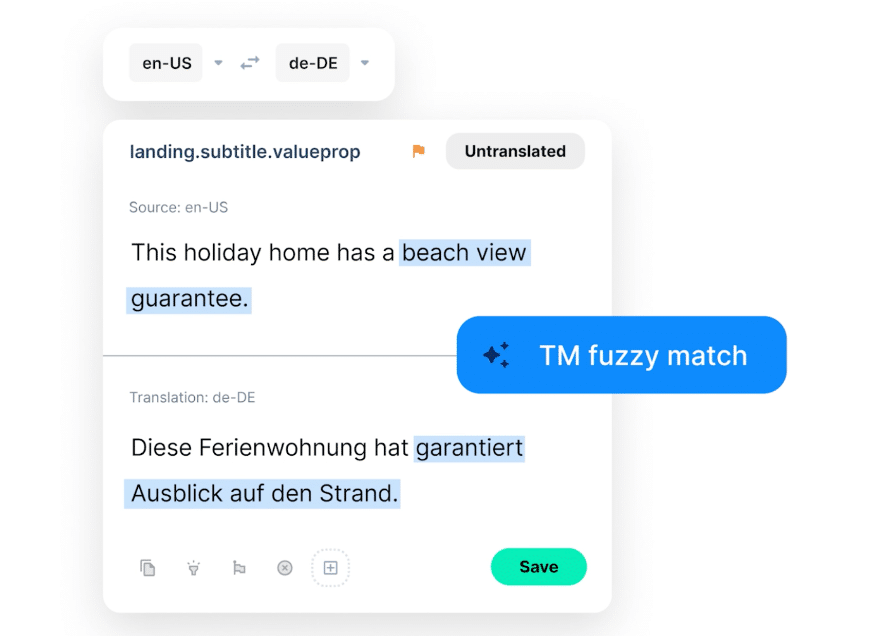
Multimedia projects often involve many types of text, such as video subtitles, captions, on-screen labels, product descriptions, Instagram graphics, brochures and even small interface elements that appear briefly in a clip. Keeping all these pieces accurate and consistent across languages can be challenging without the right tools.
Phrase helps simplify this process. Its translation platform offers automatic suggestions that give linguists a useful starting point. These suggestions are especially helpful for repeated elements or simple phrases that appear across multiple assets. The platform also stores translation memories, saving approved translations for specific terms, product names and client-preferred wording. This means that once a phrase has been approved, like a campaign slogan or CTA, it can be reused across projects, ensuring accuracy and consistency.
Modern AI-powered tools go a long way in speeding up the translation process, but automated suggestions can only go so far. Marketing content demands nuance, and a direct translation can easily miss the tone or intention of the original. That’s why human translators remain essential.
“With AI translation tools, the basic message is transmitted, but because we are expressing emotions, because we are using a colloquial tone, all the little nuances are lost. You can understand the message, but sometimes the choice of expressions is weird. They’re not real expressions that people use.”
—Irene Zamora, Translator and Content Writer at VeraContent
Local linguists can adapt phrasing, adjust cultural references and make sure the final text feels natural for the target audience. Machine translation might capture the basic meaning, but only a linguist can judge whether a joke lands, a slogan sounds compelling or an expression carries the right emotional weight.
For example, a simple line in a video subtitle might need to be shortened to match reading speed. A phrase on an Instagram graphic may require a different tone to suit local preferences. A brochure might need rewording so the layout still works after translation. These small decisions shape how audiences receive your message.
By combining Phrase’s automated tools with skilled human translators, teams can move faster without losing quality. The platform supports efficiency, while the linguists ensure that every line of text, whether it appears in subtitles, on-screen graphics or supporting materials, fits the cultural and creative goals of the project.
“Translating, adapting and localizing your subtitles to fit the nuances of each specific market is really vital from a marketing perspective to make sure your message lands the way you intend it to.”
—Scott Rose, Project Manager at VeraContent
InDesign: adapt graphics and texts for global audiences

Once your content has been translated, the next step is to adapt your visual assets so they work across different languages and cultures. This often includes updating on-screen text, callouts, captions and social media graphics. InDesign is a powerful tool for this stage because it allows designers to manage layouts, styles and multilingual templates with precision.
“The term grocery might fit perfectly on a button in English, but what happens when you need to translate that into a language with a much longer word? It takes careful consideration to make sure your visual content looks good and is effective in every language.”
—Daphne Binioris, Co-Founder and Marketing Director at VeraContent
Maintaining design consistency is essential when working across regions. Even when text expands or contracts in translation, your brand’s look and feel should remain recognizable.
One effective approach is to build flexible templates that leave room for longer strings, especially in languages like German or Spanish where labels often grow in length. Clear paragraph styles, character styles and shared libraries in InDesign also help teams keep typography, colors and spacing aligned across markets.
Tone consistency is just as important. Many brands create glossaries or translation memories for key phrases, such as calls to action, product names or recurring taglines. This ensures that audiences receive the same message, even if the language changes. When designers and linguists work from the same reference materials, it reduces inconsistencies and helps maintain a unified brand voice.
Cultural adaptation is another critical part of the process. Social media graphics often use emojis, colors, symbols and visual cues that don’t carry the same meaning everywhere. For example, certain gestures, animals or even color combinations may be positive in one culture but confusing or inappropriate in another.
This is why designers should always review their graphics with native-speaking editors who understand the cultural context of the target market. Small adjustments, like replacing an emoji, choosing a different image or adapting a joke, can make content feel much more natural.
Audience knowledge plays a major role here. Understanding which platforms are popular in each market and what types of visuals perform best there helps guide design choices. Simple research into local trends or campaigns from similar brands can reveal useful insights about humor, tone and imagery.
See also: How to translate InDesign files with speed and accuracy
Subtitle Edit: create user-friendly, localized subtitles
Translating video content is easier said than done. Unlike standard written or spoken translation, subtitling introduces extra layers of timing, structure and technical precision. A translated script is only the starting point, turning that script into clear, readable subtitles requires careful synchronization and strong subtitling tools like Subtitle Edit.
One of the biggest challenges is audio synchronization. Subtitles need to match the exact moment speech begins and ends. If they appear too late, viewers lose track of the dialogue. If they show up too early, especially in comedy or storytelling, they can spoil the moment before the visuals land.
With translated subtitles, the challenge grows: the text often does not match the length or pace of the original audio, so subtitlers must adjust timing carefully to ensure the translated lines remain readable without disrupting the video flow. Good subtitling tools help avoid these issues by displaying waveforms and frame-by-frame timing, which makes it easier to sync captions precisely.
The core of the subtitling process is time-coding, dividing the transcript into segments and defining when each one appears and disappears. Professional subtitlers split sentences at natural pauses, such as commas or prepositions, so that readers can easily understand the phrases.
“To create high-quality subtitles, we need to split up the sentences at specific points to improve readability and maintain flow. At the same time, we always try to match subtitle changes with shot changes in the video, because this makes the text easier to process by the human eye.”
—Diego Martínez, Audiovisual Translator at VeraContent
Each subtitle has to stay on screen long enough for viewers to read it, but not so long that it feels disconnected from the audio. Tools like Subtitle Edit and Subly make this process much quicker by suggesting split points, showing character counts and providing timestamps. However, human judgment remains essential in creating a polished final product.
Once the timing and formatting are complete, the final output is usually an SRT file that teams can easily upload or embed into their video. When done well, the subtitles feel seamless and allow viewers across markets to enjoy the content as if it were created for them from the start.
See also: Audiovisual translation: How VeraContent approaches video translation
VeraContent success story: How our team combined technological tools with human expertise to translate song lyrics
One of the best examples of combining technology with human expertise comes from our work with Sony Music Spain. They tasked VeraContent with translating the lyrics of Argentine artist Nathy Peluso’s single Emergencia into English and creating English subtitles for the music video.
The challenge was complex. The lyrics were packed with slang, Spanglish and cultural nuance. A literal translation would not work. The subtitles needed to preserve tone, rhythm and meaning while syncing perfectly with the visuals.
To meet these challenges, VeraContent combined creative linguists with advanced localization tools:
- Two specialized linguists familiar with Peluso’s music collaborated on the first draft, carefully translating the lyrics while retaining the song’s tone, accents and cultural references. Additional native Spanish linguists contributed insights to clarify nuanced expressions.
- Once the translation was complete, tools like Subly and Subtitle Edit were used to create precise, well-timed subtitles and produce the final SRT file.
This approach, blending human creativity, cultural knowledge and smart technology, allowed the team to deliver professional subtitles in just three days. The result: over three million views in the first month and a version of Emergencia that resonated with global audiences while staying true to the artist’s original vision.
“VeraContent is the only translation solution we’ve worked with that could accurately adapt the Spanish lyrics into English while capturing all the nuances and context of the song—and also reflecting the artist’s unique voice, writing style and power.”
—Luis Ángeles, Video Commissioner at Sony Music Spain
The Sony Music Spain project demonstrates a key lesson for multimedia localization: technology speeds up the workflow and ensures accuracy, but human expertise is essential to preserve meaning, tone, and cultural relevance. Together, they make high-quality, localized multimedia translations possible at scale.
Tools matter, but people make the difference
The software you choose shapes your workflow. But it’s the people behind the process who protect your message. The right linguists know when to adapt a slogan, when to shorten a subtitle and when cultural context requires a different approach altogether.
At VeraContent, we combine these strengths every day to help brands connect with audiences worldwide through engaging, culturally adapted content.
Ready to take your multimedia content global? Book a call with our team to find out if you qualify for a Free Content Consultation. Plus, download our free guide to content localization strategies and discover how to create high-quality, culturally adapted content that resonates with audiences everywhere.
